Sunday, June 16, 2013
Analysis of Fiction (My OpenvisConf Talk)
Here are the slides from my talk at OpenVisConf in Boston in May!
And here is the link to the video (30 mins), which might be funnier than the slides: http://www.youtube.com/watch?v=f41U936WqPM.
Finally, I did put most of my visualization tool demos online, which are linked from the talk itself. (These are visualizations I threw together in D3 to make it easier to interpret the output of my machine learning and stats analysis, since I was dealing with long text -- I needed to be able to browse the results and see the text on demand, too.)
I'll update this post with those links too, later, and maybe say a few words about my process, too. I'll be giving another talk specifically on visualizing LDA Topic Analysis in July at PyData Boston, building from some of this work.

Wednesday, March 27, 2013
Data Visualization with Nodebox
For PyData 2013, I put together a talk on using Nodebox OpenGL for data visualization. My goal was to expose the data science audience to a flexible tool similar to Processing, but that allows one to write in Python and use Python data libraries. (The java-esqueness of Processing has always put me off reaching for it when I'm working, despite a general fondness for it. I still own every single (English) book on Processing, AFAIK.)
ETA: Web video of my talk is here on the Pydata vimeo site.
My talk was generally well-received, although I think I flummoxed the stats graphics people a little bit who probably weren't expecting something so "sketchy" from me. Hey, I love those other tools too, and use Matplotlib (and d3 too!) regularly.
A few quick comments on the Nodebox eco-system: The current focus of the team in Leuven is on Nodebox 3, a block-diagram visual programming tool, not the 2 variants I talked about (Nodebox 1 and Nodebox OpenGL). I think NB3 veers away from usefulness for the data science crowd that might benefit from a Python alternative to Processing. If the enormous success of the java-based Processing is anything to go by, I'm not crazy in thinking a Python tool like it should be huge! After all, it's cuddly Python! So at the end of my talk, someone actually asked me why he should have sat there for 45 minutes if I was not talking about thriving open source code with a huge community behind it. My response was, more or less, "It's already super useful which I hope I showed, and more people could be working on it than just the original authors." That's how open source works, right? (By the way: That guy apologized to me later, but I didn't take it badly when he said it.)
A couple more comments on my slides: My own data experiments in the deck weren't incredibly successful, largely due to issues with the database I used. I wanted to explore Shane Bergsma's gender-of-nouns database collected off Google news, and what I found was that it thinks everything is really "male." Cuz most news articles are about men, probably. (Also, it proved less useful on older Gutenberg books, because old-fashioned vernacular nouns don't appear in the db, like "momma." So out went Pride and Prejudice and out came my credit card for Kindle books.) Hence, all my fiction gender plots look kind of like these, with heavy weights towards male and neutral nouns:


The pdf of my slides is here and the code zip file is here. Do check my appendices: I figured out a bunch of issues related to paths in Nodebox 1, running NB 1 from the command line, and the like.
A couple nice post-conference mentions: Jake Vanderplas's take on Matplotlib history and visualization in Python, which has some interesting comments. I spent a while talking to Ben Lorica (@bigdata) at PyData, and he nicely mentioned Nodebox in his well-RT'ed article on how Python Data Tools Just Keep Getting Better.
Also, before the conference, I was interviewed for a podcast about data vis skills. I didn't advertise this very broadly because of a few mistakes in the initial post (one in particular that claimed I hated d3, which is certainly not true at all -- I said it had a learning curve, you can listen yourself!).
ETA: Web video of my talk is here on the Pydata vimeo site.
My talk was generally well-received, although I think I flummoxed the stats graphics people a little bit who probably weren't expecting something so "sketchy" from me. Hey, I love those other tools too, and use Matplotlib (and d3 too!) regularly.
A few quick comments on the Nodebox eco-system: The current focus of the team in Leuven is on Nodebox 3, a block-diagram visual programming tool, not the 2 variants I talked about (Nodebox 1 and Nodebox OpenGL). I think NB3 veers away from usefulness for the data science crowd that might benefit from a Python alternative to Processing. If the enormous success of the java-based Processing is anything to go by, I'm not crazy in thinking a Python tool like it should be huge! After all, it's cuddly Python! So at the end of my talk, someone actually asked me why he should have sat there for 45 minutes if I was not talking about thriving open source code with a huge community behind it. My response was, more or less, "It's already super useful which I hope I showed, and more people could be working on it than just the original authors." That's how open source works, right? (By the way: That guy apologized to me later, but I didn't take it badly when he said it.)
A couple more comments on my slides: My own data experiments in the deck weren't incredibly successful, largely due to issues with the database I used. I wanted to explore Shane Bergsma's gender-of-nouns database collected off Google news, and what I found was that it thinks everything is really "male." Cuz most news articles are about men, probably. (Also, it proved less useful on older Gutenberg books, because old-fashioned vernacular nouns don't appear in the db, like "momma." So out went Pride and Prejudice and out came my credit card for Kindle books.) Hence, all my fiction gender plots look kind of like these, with heavy weights towards male and neutral nouns:


The pdf of my slides is here and the code zip file is here. Do check my appendices: I figured out a bunch of issues related to paths in Nodebox 1, running NB 1 from the command line, and the like.
A couple nice post-conference mentions: Jake Vanderplas's take on Matplotlib history and visualization in Python, which has some interesting comments. I spent a while talking to Ben Lorica (@bigdata) at PyData, and he nicely mentioned Nodebox in his well-RT'ed article on how Python Data Tools Just Keep Getting Better.
Also, before the conference, I was interviewed for a podcast about data vis skills. I didn't advertise this very broadly because of a few mistakes in the initial post (one in particular that claimed I hated d3, which is certainly not true at all -- I said it had a learning curve, you can listen yourself!).
Friday, February 15, 2013
My Upcoming Talks, Spring 2013
I've got a busy few months ahead! Here's where I'll be speaking...
Peter Wang from Continuum.io asked if I'd submit something to PyData SV, perhaps after I noted the lack of women speakers at the last 2 events. :-) This small conference is the best place for python data science talks -- I've enjoyed and learned a lot at both previous ones. I'm happy to be talking about using the Pythonic versions of Nodebox as tools for data visualization.
In April, thanks to Will Evans, I'll be giving a workshop on quantitative skills and analytics for product designers at Lean UX NYC. Here's an interview with me on their website, talking about becoming quantitative and lean data organizations. I'm still toying with the final content, but I expect to cover some advanced Excel maneuvers, a little bit of Google Analytics analysis, and some stats of use in UX work.
It's a new visualization and data conference, the OpenVis Conf! Bocoup.com and @ireneros are running a great new event in Boston, and I'll be speaking too! Here's my talk plan (titled "The Bones of a Bestseller"):
I know a bunch of Twitter friends are coming to all 3 of these conferences... I can't wait to see you all!
PyData SV 2013 in March
Peter Wang from Continuum.io asked if I'd submit something to PyData SV, perhaps after I noted the lack of women speakers at the last 2 events. :-) This small conference is the best place for python data science talks -- I've enjoyed and learned a lot at both previous ones. I'm happy to be talking about using the Pythonic versions of Nodebox as tools for data visualization.
Lean UX NYC in April
In April, thanks to Will Evans, I'll be giving a workshop on quantitative skills and analytics for product designers at Lean UX NYC. Here's an interview with me on their website, talking about becoming quantitative and lean data organizations. I'm still toying with the final content, but I expect to cover some advanced Excel maneuvers, a little bit of Google Analytics analysis, and some stats of use in UX work.
OpenVis Conf in May
It's a new visualization and data conference, the OpenVis Conf! Bocoup.com and @ireneros are running a great new event in Boston, and I'll be speaking too! Here's my talk plan (titled "The Bones of a Bestseller"):
How do Dan Brown and Stephanie Meyer do it? Most text visualization focuses on word counts: in this talk, Lynn will illuminate how fiction "looks" at a meta level, using a combination of meta-linguistic analysis and simple machine learning. Beyond just words, long texts are composed of sentences, paragraphs, and chapters, and the pacing and theme are reflected in these as well as word choice. With a little finesse, we can detect and graph the famous story arcs that screenwriters and fiction teachers are always talking about. With a little more finesse, we can write an action scene detector or a sex scene spotter and visualize how exciting a novel is — in all senses.
I know a bunch of Twitter friends are coming to all 3 of these conferences... I can't wait to see you all!
Sunday, November 04, 2012
Strata NYC 2012 and PyData
A week ago, I gave a talk at Strata NYC on network visualization ("Beyond the Hairball"). The talk had many technical issues (I'm new to using a MBP and Keynote to present), but the slides seem to have had some kind of life on Twitter. So here's the rather large and slightly academic deck:
I was gratified to get so many RT's, email, and favorites from people including Gilad Lotan, Steven Strogatz, and Ben Shneiderman.
Strata itself baffled me a little due to size and "big data" hype factor -- I got a little tired of overhearing businessmen on their phones talking about "monetizing social." (Why did "social" have to become a despicable noun?) My favorite moments were certainly social more than technical: getting to meet Noah Iliinsky and Kim Rees, seeing Danyel Fisher from MSR and his game analyst partner Kim Stedman, Wes McKinney (with his new book, Python for Data Analysis), and Jon Peltier and Naomi Robbins. These folks made for a very nice data vis and python slice of the big data conference.
Then There Was PyData!
I love it when a technical conference isn't afraid to show code, and make code available. That was PyData! Here were some highlights for me (with two tracks, I missed half of it!):
- Timeseries in Pandas, from Chang She
- NLTK, or "Just Enough NLP with Python" from Andrew Montalenti (See also his "Webcrawling and Metadata" slides)
- Statsmodels and Patsy from Skipper Seabold (his 538 model in python is here)
- The always wonderful scikit-learn tutorials from Jake VanderPlas (here's a homepage for some of it) and Stefan van der Walt's mind-blowing scikit-image stuff
- Brian Granger's really excellent overview of updates in the IPython notebook (here's a general tour of the notebook in the online notebook viewer; and here's their example notebooks folder on github)
All in all, Pydata was a good couple of days, well worth the trip! They could stand to get a few women to speak at the next event, though. (No, I'm not volunteering!)
Saturday, August 18, 2012
UK Bestsellers: Remash By Genre and Gender
You know how you have a giant collection of datasets saved, but you never seem to get to them? The Guardian Datablog posted one that moved me from my usual weekend lethargy. Not about some world injustice, a critical healthcare issue, or anything Genuinely Important -- but UK book sales data, checking into whether Fifty Shades of Grey is really the UK's bestselling book of all time.
I grabbed it and had a poke around. My curiosity was less about EL James (although mad props to a fanfic writer for making the big time) than about general genre and gender distributions. At a base line, when I did some hasty labeling, I saw that as expected, fiction overwhelms, and women are writing more of it:

Then I threw in some data analysis, just to see if there were any trends there. Okay, EL James finally pops up. Maybe there is a mild trend towards women selling more here?

Then I looked at publishing houses. I wondered if any of them were perhaps making more money off women than off men, and which ones?

This one suprised me a little more than I expected. Bloomsbury publishes JK Rowling, of course (and Khaled Hosseini, who incidentally lives in the USA). The rather macho-looking Transworld has Dan Brown, Bill Bryson, Richard Dawkins (and also Joanne Harris with Chocolat).
But the quickie plot that got me really motivated to spend my Saturday on graphs was this one:

My first thought was "How very irritating: the women bestsellers are all labelled as writing for children, even though they dominate the list. And what is up with the science fiction and fantasy group there?" It seems that one of JK Rowling's oeuvre was a top seller in its "adult" edition too. The one male author in SF&F is Tolkien (for Lord of the Rings, all of them, I suppose). Which means that no actual "science fiction" is on this list, it's all fantasy, if you're tracking genre like I do. Other big names for kids are the Twilight series and Hunger Games series, also stuffed into "Young Adult." EL James is classified in "Romance & Sagas." I guess there's no "Porn" category, or "Adult," like there is for movies, which I think is a real prudish shame.
I regrouped a bit; I put the fantasy books together, whether they are for "kids" or not. That includes Philip Pullman, Stephanie Meyer, Suzanne Collins. Most adult women I know have read JK Rowling, Stephanie Meyer, and Suzanne Collins. I actually find it disgusting that publishers would trivialize these authors as writing "for kids," especially given what's in them -- but that's a gender genre rant for another day. I left Time Traveler's Wife in General Fic, although it could go in Romance or Fantasy, I suppose. I put the two Bridget Jones in with Romance, although I feel the Romance vs. General Fic to be a rather slippery slope. I did not put Chocolat in Romance. I grouped the Biography and Autobiography together. The food and diet related items seemed most interesting as a meta-group. Here's my remash of the genre and gender stats:

Men are represented in more genres, even with my regrouping. But why are there no women in Crime, Thrillers and Adventure on this list? Where are the women mystery writers? (Did I perhaps miss one I should have categorized as genre?) Likewise, there are no male Romance & Saga writers shown here. Yeah, I think the jokes about male "sagas" really are due at this point. (Note a couple links from a recent Twitter exchange on long books by men: "The Exasperating Maleness of Long Novels" and "Why Don't Women Write Long Novels?".)
Finally, I did one arranged by author, just to see, and of course JK Rowling rules the list. Male and female authors are pretty evenly distributed throughout, as well.

What's most interesting here is that the very last one listed is Suzanne Collins, despite the recent Amazon announcement that the Hunger Games books have now outsold Harry Potter on their site. Curious! A US/UK difference? Ebooks not accounted for in the Neilsen data?
Just in time, the Hunger Games DVD is out, and I know what I'm watching tonight. It's also high time I gave Fifty Shades of Grey a shot, even if it's not SF & Fantasy. If you want to check my recodes and the original data, I uploaded the spreadsheet with my new columns here. Please let me know if you think I made any mistakes in recategorizing (or especially gender labels).
PS. I screened out the weird Beano entry, which has no author listed. So this is really about the top 99 books.
PPS. At Readercon recently, a bunch of SF&F writers on a panel said the way to publishing success was to "write a boring thriller." (Me: "I could totally do that!") Now I think it's: Write a great fantasy with teen heros that a publisher will buy from a woman, that in a great act of resistance against age-ist stereotyping by The Man, adult women everywhere download and enjoy shamelessly and tell each other about where male publishers can't hear.
I grabbed it and had a poke around. My curiosity was less about EL James (although mad props to a fanfic writer for making the big time) than about general genre and gender distributions. At a base line, when I did some hasty labeling, I saw that as expected, fiction overwhelms, and women are writing more of it:

Then I threw in some data analysis, just to see if there were any trends there. Okay, EL James finally pops up. Maybe there is a mild trend towards women selling more here?

Then I looked at publishing houses. I wondered if any of them were perhaps making more money off women than off men, and which ones?

This one suprised me a little more than I expected. Bloomsbury publishes JK Rowling, of course (and Khaled Hosseini, who incidentally lives in the USA). The rather macho-looking Transworld has Dan Brown, Bill Bryson, Richard Dawkins (and also Joanne Harris with Chocolat).
But the quickie plot that got me really motivated to spend my Saturday on graphs was this one:

My first thought was "How very irritating: the women bestsellers are all labelled as writing for children, even though they dominate the list. And what is up with the science fiction and fantasy group there?" It seems that one of JK Rowling's oeuvre was a top seller in its "adult" edition too. The one male author in SF&F is Tolkien (for Lord of the Rings, all of them, I suppose). Which means that no actual "science fiction" is on this list, it's all fantasy, if you're tracking genre like I do. Other big names for kids are the Twilight series and Hunger Games series, also stuffed into "Young Adult." EL James is classified in "Romance & Sagas." I guess there's no "Porn" category, or "Adult," like there is for movies, which I think is a real prudish shame.
I regrouped a bit; I put the fantasy books together, whether they are for "kids" or not. That includes Philip Pullman, Stephanie Meyer, Suzanne Collins. Most adult women I know have read JK Rowling, Stephanie Meyer, and Suzanne Collins. I actually find it disgusting that publishers would trivialize these authors as writing "for kids," especially given what's in them -- but that's a gender genre rant for another day. I left Time Traveler's Wife in General Fic, although it could go in Romance or Fantasy, I suppose. I put the two Bridget Jones in with Romance, although I feel the Romance vs. General Fic to be a rather slippery slope. I did not put Chocolat in Romance. I grouped the Biography and Autobiography together. The food and diet related items seemed most interesting as a meta-group. Here's my remash of the genre and gender stats:

Men are represented in more genres, even with my regrouping. But why are there no women in Crime, Thrillers and Adventure on this list? Where are the women mystery writers? (Did I perhaps miss one I should have categorized as genre?) Likewise, there are no male Romance & Saga writers shown here. Yeah, I think the jokes about male "sagas" really are due at this point. (Note a couple links from a recent Twitter exchange on long books by men: "The Exasperating Maleness of Long Novels" and "Why Don't Women Write Long Novels?".)
Finally, I did one arranged by author, just to see, and of course JK Rowling rules the list. Male and female authors are pretty evenly distributed throughout, as well.

What's most interesting here is that the very last one listed is Suzanne Collins, despite the recent Amazon announcement that the Hunger Games books have now outsold Harry Potter on their site. Curious! A US/UK difference? Ebooks not accounted for in the Neilsen data?
Just in time, the Hunger Games DVD is out, and I know what I'm watching tonight. It's also high time I gave Fifty Shades of Grey a shot, even if it's not SF & Fantasy. If you want to check my recodes and the original data, I uploaded the spreadsheet with my new columns here. Please let me know if you think I made any mistakes in recategorizing (or especially gender labels).
PS. I screened out the weird Beano entry, which has no author listed. So this is really about the top 99 books.
PPS. At Readercon recently, a bunch of SF&F writers on a panel said the way to publishing success was to "write a boring thriller." (Me: "I could totally do that!") Now I think it's: Write a great fantasy with teen heros that a publisher will buy from a woman, that in a great act of resistance against age-ist stereotyping by The Man, adult women everywhere download and enjoy shamelessly and tell each other about where male publishers can't hear.
Wednesday, July 04, 2012
Captain America is Getting Some (In the Fanfic)
What could be more appropriate for July 4th than Captain America?
If you've seen the movies a lot already, and you're wanting more, there's always the fan fiction. Of which there is a lot. I admit, I read it. And I got a little data curious over the weekend.* WARNING: Look away now if the idea of hot boy-on-boy superhero action makes you queasy, because there's a lot of such hotness in the fiction. (Also hot girl-on-girl, and girl-on-boy, and girl-on-boy-on-girl, and god-on-HULK-on-brother, etc, cuz it's ALL there.)
Surprisingly, the dreamy super-soldier Captain Rogers is not getting quite as much action as Tony Stark is. And there are a few other surprises in there, if you click around on this little chart.
Who's Sleeping With Whom?
Select an Avenger's bar to see who they are getting it on with in the fanfic by story count...
Count of Stories by Pair (Gray With Red)
Yes, that's right, even DEAD people are getting it on in these stories. Try clicking on Phil Coulson. If you were (like me) blind to suits over spandex, he's "Agent Phil" with the tie. His favorite bunk buddy is "Hawkeye" Clint Barton! I wasn't sure they ever even talked to each other until I rewatched Thor last night (Coulson stops Clint from shooting Thor when he #fails with the hammer in the plastic building; they seemed to be on a purely last-name basis, but what do I know!).
Thor and Loki seem to have it hot and heavy too, family issues aside -- hey, they're gods, they both make and break the rules.
I'm personally a little disappointed not to see more girls getting action here, but I am definitely down with the allure of Tony Stark and Steve Rogers. All those muscles, all that antagonism to overcome! But there is surprisingly little lesbian romance in the archive. (Hang on, is there a "no two red heads" rule? Aren't they both red heads?)

But back to Tony and Steve... I dug a little further and discovered that their sexy love stories were pouring in well before the movie, as early as 2008. With the release of the movie, some new pairs got steamy, like Tony and Bruce, who really were so adorable playing with radiation together and poking each other (snicker). And there must be something in the comics about Phil Coulson and Clint Barton? It might get expensive to look into it. Perhaps I need to visit Jer Thorp('s comics collection).

But let's go back to Tony (again). He gets all the action, even if he doesn't wear spandex and look like a Norse god. And despite that unfortunate facial hair! Captain America has no serious contender for SO apart from Stark. Tony's a reformed weapons dealer, "genius, playboy, billionaire, philanthropist," who engineered his own superheroness, without any magic, medicine, or lab incidents. It's no surprise to me that men AND women love him, and he gets the bulk of the fan fiction. He's on top of the world, so of course he's on top of Steve Rogers! Tony Stark is a self-made superhero, and that's why he gets laid the most. In one of the best Tony lines ever, scifigrl47 has him saying:
"I somehow managed to get CAPTAIN AMERICA doing the horizontal mambo. Fuck you all, I win. I win everything."
And that's pretty much a real American hero talking.
*PS. I am not telling you where the stories live. The fiction database is suffering greatly from the load of Tony's authors and fans hitting it, and it keeps falling over. All this data was collected fairly manually at weird hours, and I had to squash hard my urge to crawl it properly and verify many hypotheses. Please don't try this yourself.
Friday, June 15, 2012
Eyeo 2012: Processing My Data Vis PTSD
As an ex-researchy type, I'm used to the papers and speakers at conferences like Infovis, the academic visualization conference that meets during IEEE Visweek; but last week's Eyeo Festival was... different. In the past few years, I've been to a handful of the former-Flash-community's digital art conferences (such as Geeky By Nature and Flashbelt). They inspired me, made me think about the value of personal digital art projects; but as someone who wants to work in data visualization, Eyeo was more challenging to me. In a good way!
Who Was There
The audience was itself pretty amazing - you could tell by the Ignite-style talks on the first evening, which blew me away, including pal Jen Lowe (@datatelling)'s talk on the human in the data deluge, feisty Rachel Binx on animated gifs, Sarah Slobin (@sarahslo) from the Wall Street Journal, CSS artist Val Head (@vlh), Bryan Connor of The Why Axis, Sha Hwang's (@shashashasha) dry awesomeness... The non-speaking audience turned out to be pretty astounding as well, including Jesse Thomas of JESS3, Jeff Clark of Neoformix, Mike Bostock (@mbostock) who created D3.js, JanWillem Tulp, some dude from a strategy firm advising the British Government on technology, folks from MOMA and the NYPL and the Met, and, well, really pretty much everyone I talked to was intellectually interesting in some compelling way.
"Luck is chance that matters." (Kevin Slavin)
The chance of having a randomly interesting conversation was extremely high -- for example, it turned out that a guy I got to chatting with as we crossed the street lives in my area and had been intending to email me about his startup after hearing about a talk I did locally.
Who Wasn't There
There were not many people I associate with the academic "infovis" scene, and a couple of us wondered about that. Likewise, at the Infovis conference last year, the data artists and vis consultants of Eyeo were not present either, see my post moaning about that here. I put it down to a handful of things: the Eurovis conference was the same week (super awkward if you wanted to follow the hashtag and had bad wifi/phone as I did), and the tickets to Eyeo sold out in less than a day, so if you weren't paying attention, you weren't in that audience.
"I have not yet mentioned other people's good ideas. They exist." (Moritz Stefaner being hilarious)
Since those tickets were mostly broadcast on Twitter, if you aren't following the "artistic" infovis crowd, you weren't in the running. (Check my posts here and here about the subcommunities of infovis folks on Twitter, with thanks again to Moritz Stefaner whose hairball I picked on initially, but make sure you read his awesome Eyeo slides on networks as well.)Since Visweek this year wants to get practitioners in the mix, I think there are some things the organizers might learn from Eyeo, given how much data visualization was there: are you spending time understanding what practitioners are inspired by, what tools they use, what they're trying to learn, what they want to work on, who they want to talk to or get advice from? Academic conferences result in papers that can be read, which hopefully contributes to the evolution of the discipline (if they are accessible afterwards -- Eurovis papers do not seem to be!), but this means it's easy to justify not attending in person if you're a practitioner. A conference must have value outside the papers for the non-academics, like provocative panels, tutorials for skill building, networking options with a great audience, drinking... otherwise, we can all just read it later.
Eyeo was definitely a conference to be AT -- not to escape to go hack in your room during sessions, and not to read about later. Watching the recorded videos will give you a flavor, but it's not a replacement for the serendipitous goodness.
The Eyeo speakers who "overlap" these two communities the most in content seemed to be Amanda Cox of the NYT Graphics team, Fernanda Viegas and Martin Wattenberg, and Moritz Stefaner. Amanda Cox was capstone presenter at Visweek last year, and was a highlight of that conference for me, because of how much she made the newspaper vis problem a design problem, even confronted with a lot of data in R. (Amateur tip: Don't tell her you have a crush on her, it won't end well.)
"+1 newspaper graphics for having a conference named for a bipolar anarchist" - (Amanda Cox re Malofiej)
Viegas and Wattenberg usually review for and publish and present at Infovis, although their talk at Eyeo was much more personal and "design" focused. Moritz Stefaner cited Infovis work in his talk on network design, including Wattenberg's Pivotgraphs and Holten's hierarchical edge bundling technique, a technique used in many circular node layouts now. These folks bridged the two conferences a little bit, but the gap still feels overly large to me. I hope to see more discussion of artistic design aesthetics and process at Infovis one of these years!
More On How the Sausage Was Made
A deeply valuable aspect of many talks was that superstars showed us how the sausage was made, with really funny commentary about the mistakes along the way. This is something I rarely get out of academic conferences, which would help me learn and would help my morale, I have to admit.
Martin and Fernanda actually showed their Java project in eclipse, used to sketch the pre-final wind flow map. Their intermediate stages were shockingly terrible ("look away if you're epileptic"), until they stumbled on the right direction with gradient arrows. So reassuring to see the guts and thought process re-enacted! The final solution is brilliant in its simplicity, but it took a while to get there.
 |
| Wind map detail (Viegas and Wattenberg) |
Felton's process for his annual report design was wonderfully self-deprecating and revealing: 15 days of a mostly blank page, feeling "like a mouse in a bathtub" with no traction, until he started making structural decisions for the framing of the latest annual report. And watching him edit his slides over his shoulder before his talk was an education in itself (he uses InDesign and Illustrator).
"What are those particles? Magic dust; that's a newbie question." (Moritz Stefaner)
Moritz Stefaner showed his designs for the recent meusli project; he chose the chord diagram over the possibly-more revealing matrix design because the matrix doesn't look "tasty" and "meusli shouldn't look like fungi."
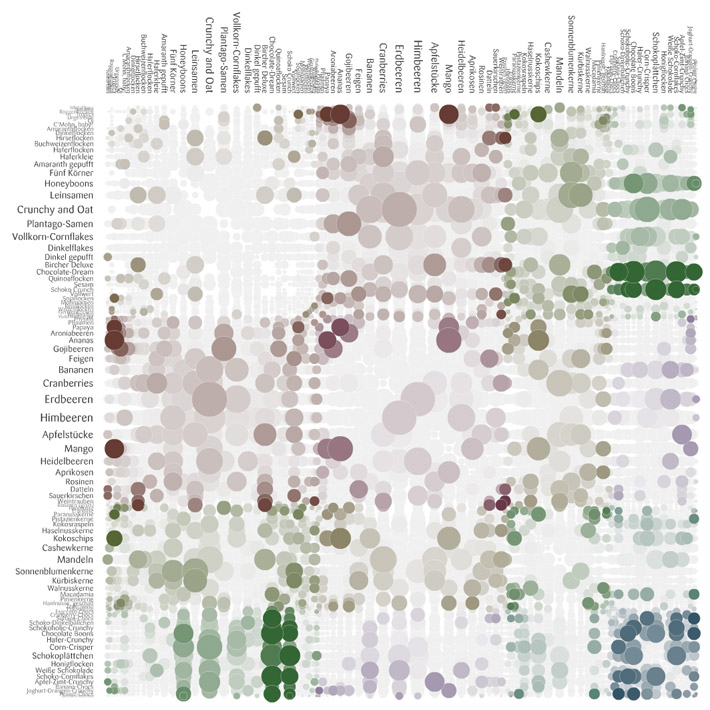 |
| Stefaner's rejected "fungi" visual of muesli |
Moritz was also very thoughtful in his explanation of why they deliberately avoided axes labels and the addition of the purely ornamental role of the particles in the Max Planck Research Networks.
A slightly random aside about one of Moritz's projects with Nand.io -- but if like me you wondered what that floating mill on the River Tyne looks like:
 |
| Tyne Floating Mill (Source of stats for the beautiful Tyne Flowmill visualization) |
And here's a snap from the beautiful Tyne Flowmill project image archive:
 |
| Tyne Flowmill visualization details |
You can find this same vein of honesty about process (and failures on the way) in the excellent and often funny Chartsnthings blog of the NYT Graphics team process, run by Kevin Quealey (@KevinQ). Kevin was there too and took the news of my crush on Amanda much better than she did. I was told that the NYT has no budget for travel -- yet there was a sizable contingent from their Research Labs and the Graphics Team. I guess that's the best indicator of a conference that's a successful destination event: People will pay their own way to attend.
Tool Use
Repeating yet again, I got really interested in that process stuff. So, here are some of the sketching/intermediate tools used before the final versions that I heard or inferred:
- Hand-written calculations and paper highlights (Stefanie Posavec)
- Java (Martin Wattenberg and Fernanda Viegas)
- Processing and MySQL, pdf exported into Illustrator and InDesign (Felton)
- Tableau and Excel and Gephi and Processing and Photoshop (Moritz Stefaner)
- R (Amanda Cox) [I know this from the Chartsnthings blog and a previous talk; although the NYT Graphics team uses many other visual design and development tools as a group]
- Processing (Ben Fry, Wes Grubbs, Jer Thorp)
- Dat.GUI (Koblin)
Did I miss any, anyone know?
Worthwhile Career Risks
It's risky enough to be an independent consultant these days without sophisticated insurance, but it's even riskier to try to do artistic information visualization that is stays honest and solidly grounded in the data -- there are only so many gigs with Wired or GE or Popular Science out there. The people I admire seem to have them pretty well covered. Getting a business informatics gig is a lot easier, given the millions of startups and companies rolling in data right now.
"Here Are Some Words; We Hope You Find Something (and if you do, would you mind tweeting about it)" (Amanda Cox)
Even more risky is trying to limit your work to visualizing "data for good," the motto of Periscopic (represented at the conference by Kim Rees (@krees) and Dino Citraro), echoed by Jake Porway with his new DataKind project and Code for America, represented by the very articulate Jennifer Pahlka. As Jer Thorp asked of the panel he organized, "How do you do this kind of socially conscious work, and still pay rent in New York?"
Luckily we're not all in NYC, but the same question holds in some form for most independents: turning down work based on ethical questions about the client or the data message is a luxury not all of us can afford. When "brands" come knocking, it's tough to say no, especially if they're rich and you're not. Jake, at least, suggested a path to being involved as a part-time volunteer (see his "I'm a data scientist" signup page). Incidentally, Porway's example of a visualization that "does good" was the animated timeline that illustrated the spread of London Riot rumors--and their corrections--from the Guardian:
 |
| London Riot Rumors on Twitter from the Guardian |
I found this theme of "doing good with data" an inspiring reminder, and I'm glad to see it playing a part in this kind of high-touch, high-concept conference. Enormous thanks to the organizers for this, and to the Ford Foundation sponsorship for enabling them.
Insecurity Admitted, Hilariously (and Inspiringly)
Why were so many of the speakers so funny? No one is funny at academic conferences, unless they've had a lot to drink and you're no threat to their tenure process. Robert Hodgin (@flight404) is basically an artistic standup comedian. Or a comedian who does digital art, I'm not sure. And he's like that every time I see him, with whatever material, so it's not like this was super-practiced.
I almost hurt myself laughing when Jer Thorp described some of the weirder Avengers from his massive comic collection (Whizzer, Starfox who "stimulates the pleasure centers of the brain" and was therefore brought up on charges for sexual harassment at one point?!).
Google "pugs in costume," it'll change your life. (Wes Grubbs)
And you too can enjoy Ben Fry's recap of the critic who accused him of having a Degree in Useless Plots from Superficial Analysis School in his "I Think Somebody Needs a Hug" post. But I'm still waiting for the post of the very funny Famous Writers drinking saga by Ben's colleague at Fathom.
There was a lot of wry humility, too -- Wes Grubbs recounted how proud they were of the spread of their Wired piece for 311 calls, and then found out that it was in an issue with cleavage on the front. Regardless, Tim O'Reilly used it in a TedX talk and it got a slot in the MOMA Talk To Me exhibit, so I think it had legs even without the cover boobs.
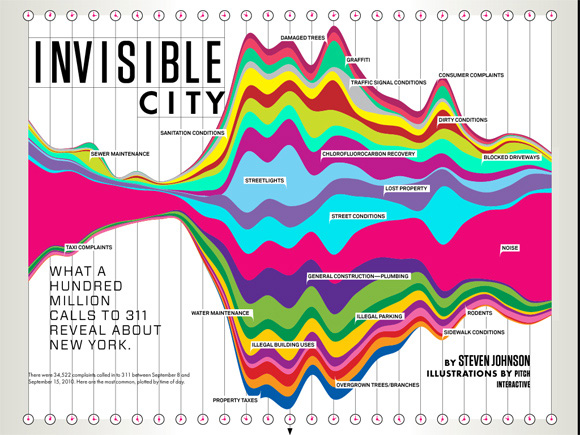 |
| Pitch Interactive for Wired |
Speaking of humility, a few days after the conference, Robert Hodgin posted his astounding talk code on Github with an awesome, hilarious, apologetic README that should be required reading for anyone trying to learn creative coding without a computer science degree:
I recognize that I can make some great looking work, and I am proud of this fact. But as soon as I am engaged in a code-related conversation with someone who knows C++, someone who knows proper code design, someone who knows how to explain the difference between a pointer and a reference, someone who polymorphs without hesitation, the bloom falls from the rose and I end up looking like an idiot. Or even worse, a fraud.
If Robert Hodgin and Jer Thorp can feel like hacks or frauds, then maybe it's okay if I have imposter syndrome too; and if I want to make an interactive vis project of Avengers' penis sizes for charity, I should probably just own that desire and run with it. And if you made it this far and now you don't want to hire me for anything, so be it! Everyone needs to pursue their dreams.
Sunday, May 13, 2012
My Most Influential One Pixel Line
I thought I'd contribute one story to the "telling stories with data" genre, even if it's a silly one. It's silly 'cuz it features such a silly graph, which I shoved into an appendix of a presentation for a client a few years ago. Here's an anonymized version:

I put that animation with the arrow in there on purpose, because when I presented it, I had to point out the skinny line on the top. More graphs than you'd expect come with a "performance" part and in some contexts, I think this is just fine. Afterwards, one exec at the company referred to it often as "that chart with the one pixel line." (Okay, technically it had about 2 or 3 pixels. Not as punchy if you refer to it as "that chart with the 3 pixel line" or "that chart with the thin red line.")
I'm sure there are other, better, ways to present this red-and-orange tower. The point is: It was remembered. It had an impact. This graph led to more graphs being created! Roughly, we saw these steps:
- Acknowledged and admitted: The one pixel red line was considered to be a problem (or rather, the un-analyzed orange bar was).
- More descriptive graphs were made: This is key &emdash; an influential graph/chart always leads to more data investigation, with more graphs. Describe the size of the problem, delve further. The giant orange segment was tackled: How could it be made manageable? What patterns existed inside it?
- Sensemaking/iterpretation: What could we do, what couldn't we do? What should we prioritize or safely ignore? What tools were needed? Who owned what parts of this orange bar?
- Data tools sprouted: A series of ad hoc and then longer term tools were built: Excel reports with perl/python/VBA, then a Flex tool for intermediate data dives, then a dashboard in Flex for tracking larger picture trends.
Do It Well, and Do It "In-House"
It's an old analytics saw that you can't improve what you don't measure. Well, I think you won't improve what you don't measure meaningfully and then pay attention to. The client had collected the data, but then did nothing with it, because no one had made understanding it a priority. Data for data's sake is pointless and will be ignored. At the time of my one-pixel bar, an analytics cheerleader in the company described our primary data system as "buggy, opaque, brittle, esoteric, confusing." I'd add, "understaffed," and as a result of all that, usually ignored, which is how the one pixel red line came to be.
We took a brief detour in which we considered "outsourcing" the data problem to another company to do the top-level reporting for us, but our (mostly my) investigations suggested we couldn't do the fine-grained, raw-to-dashboard (ETL) reporting and analysis we needed without owning the entire pipeline ourselves. Because in all these organizational, data-driven settings, the reasoning goes like this:
- What's going on? Now, and as a result of previous behaviors/changes. Do we have the right data? Trends, alerts, important KPIs.
- Why is that going on? Drill in. Question if we have the right data and instruments to diagnose. A deep dive occurs, often all the way back to RAW data. This is normal! And this is necessary.
- How might we change the bad things? This is a complicated question, never simple and often not just quantitative. This is where the profound thinking happens, when the cross-disciplinary methods and teams pull together to interpret and chop data. Sense-making and interpretation require lots of checks on data, reasoning, and context.
Cross-Disciplinary Success
Our ultimate data team was a cross-company, somewhat ad hoc group of people who cared about the same thing, but didn't report together anywhere: Customer Support, UI development management, directors of development and the API team, a couple of database gurus. Oh yeah, let's not forget the database gurus: I couldn't have even made that bar chart without badgering the database guys for info on their tables, so I could do some SQL on it.
In a year, we had achieved measurable significant improvements, via that cross-disciplinary team, and without out-sourcing our important data in any way. The short-term tools paid off almost immediately, and I hope the long-term ones are still evolving. One of the team members won an award for the tool he developed for exploring important raw data (and I did contribute to the design). None of this was done under official reporting structures. But the organization was flexible enough to support the networking, collaboration, and skills needed.
I Did Other Stuff, Too...
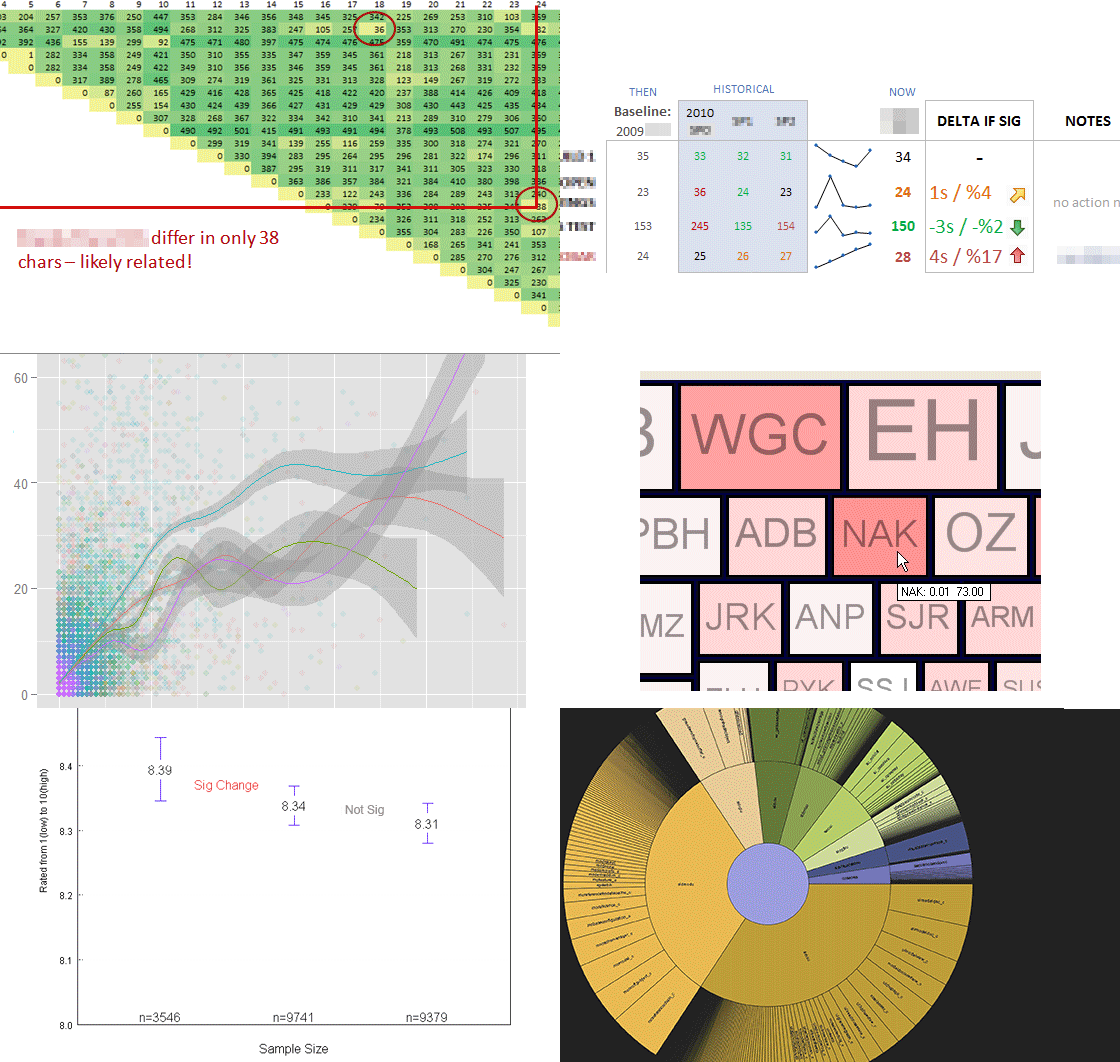
Since that graph is so silly, here's a little montage of other exploratory data and design work I did while I was with that client. Lots of tools were involved, from R to Tableau to Flex to Python to Excel to Illustrator. Vive la toolset!
Sunday, March 18, 2012
Digging Into NetworkX and D3
For Boston's Predictive Analytics Meetup in February, I gave a short talk on using the python library NetworkX to analyze social network link data, illustrated with some simple D3.js visuals of the results. I've since spruced up the slides to stand on their own a bit better, extended a few of the examples, and moved it all online.
Here's a link to the zip file of the ppt, heavily commented code samples, and the network edgelist I used (from Moritz Stefaner's and my previous look at Twitter Infovis folks in mid-2011). Or you can browse the slides below (the links should work fine).
A Fast and Dirty Intro to NetworkX (and D3)
View more PowerPoint from Lynn Cherny
A few comments, if you made it through the deck... The network stats are doubtless out of data, since I know there has been some movement in who-follows-whom among the Infovis crowd on Twitter. The overall workflow proposal is this:
- Read in your edgelist into NetworkX (or a json file if you already have one)
- Convert to a NetworkX graph object
- Calculate stats and save them as attributes on the graph nodes (my code shows you how/does it for you)
- Optionally here: Filter the network by some important attribute.
- Write out JSON of the network to use elsewhere (e.g., D3)
- Visualize (in D3) and explore what you got
- Optionally here: Filter the network further in the interactive visualization.
- Go back to (1) and add more stats. Or filter some more.
In my previous post using Gephi to analyse the infovis network, I labelled one subcommunity "The Processing" crowd, another one "The Researchers" and another one "The Authorities." In my current analysis, where I find 6 subcommunities (or "partitions"), you can see them as roughly the green partition (Processing folks and infovis artists), the orange partition (the research/analytics group), and the blue partition (with high-degree authorities like infosthetics and flowingdata).

The different demos make different things clear about this data, as you might expect!
- The adjacency matrix of the top 88 chosen by eigenvector centrality reveals that the orange partition, or the Researchers, have more members with high eigenvector centrality than the other subgroups. This is quite clear when you sort by Partition. Other partitions are barely represented here. (NB: It was only 88 because it was all that fit easily; for the other demos, I use a subset of 100 out of the full 1644 nodes.)

- The chord diagram, which allows you to toggle between the 100 person top eigenvector scoring subset vs. all 1644, shows a striking difference between the subset of 100 and the full set. It's even more obvious here how the orange partition (the "Researchers") overwhelms the top eigenvector subset, and how little of the large green group are represented in this subset. We can certainly speculate why this is...

- The force network of nodes allows you to see some individual following patterns, at least among the "most important" top nodes. In this example, I filter the graph inside the javascript code, instead of in the NetworkX code. The graph shows a union of the top nodes selected for eigenvector centrality, betweenness, and degree. Some of them near the edges don't follow anyone in the "top" network sample, but they made this cut by being high in one or more measures of degree, eigenvector centrality, or betweenness. You can resize by each variable, or click on one to see the individual's values.

Once you get started making these visuals, you want to tinker forever... I hope the code samples and comments help you get started, if you want to try to do something in this line! Once again, talk slides plus source are in this zip file. Be sure to note my warnings and gotchas if you tinker yourself.
For a recent and different analysis of talk among the Twitter Infovis crowd, visit @JeffClark's posts here and here and here. (He's an orange, top N member in my graphs.) He identifies "red" and "blue" groups based on their interactions and words used. His two primary groups seem to correspond to the processing/artists (green) and researchers/analytics (orange) distinctions I found in this older data.
Sunday, November 20, 2011
A Kindle Fire Review (from a Media Fan)
I'm a Kindle fan, and an Amazon fan. I really like their media content: I buy Amazon music, Amazon Kindle books, TV shows, Android apps. So when my Kindle Fire came, it was pretty much pre-loaded, and that was really nice. All my stuff is sitting there with a little "download to device" arrow, which rocks.
I got this thing because of upcoming travel over the holidays (I don't own an iPad, I think they're too big). I was never intending to take the Fire instead of my reading Kindle, and after 5 days, I still wouldn't. Partly that's battery-life-related; I adore my reading Kindle for the everlasting, never-needing-to-charge-it, one-handed reading wonder that it is. The Kindle Fire battery supposedly lasts about 8 hours, and that may not be true with video watching and wifi on (I haven't tested that part yet).
So, this is not a Kindle-killer, anymore than it's an iPad killer, 'nuff said there.
More specifically, I got the Fire for video watching, web browsing/email/twitter, PDF reading, and light app use (Solitaire, Angry Birds, etc), in about that order of priority. So let's hit those, with some UI observations along the way, because that's where the chance for the Fire's improvements really lies. Then I'll finish up with a few comments on major navigational issues, e.g., scrolling, selecting, typing, which permeate the product.
Video Watching and Disk Space
The Fire seems to want you to mostly stream, which doesn't surprise me. The 8GB drive, and the free Amazon Prime (streaming only) support this. Netflix and Hulu Plus work on it (install their free apps from the store). If you have ever paid for a TV show ep (I sure have!) from Amazon, THOSE can be downloaded to your device. (Browse to a show you have bought episodes for, and they tell you they're still yours, and you can download to your device now!)
Why does this matter? If you're wanting to use it on an airplane, or in iffy hotels off the grid, which I do, you need to download to your device. And if you want to load video you already have, I did the research: It only recognizes MP4, so you need to convert stuff. (I'm using AVS Video Converter; my version does only one file at a time, which is proving to be a giant slow babysitting process.)
You can load videos (or PDFs, or mobi files, or anything else) when you attach your device by USB cable. Drag them into the Videos folder.
But don't expect them to show up in the Videos section of the UI, reachable by the top tabs! They will be found in the rather hidden pre-installed "Gallery" app, which is where your photos and videos live. And then you may be surprised by how poor the UI is for the videos (I am praying they fix this, it's un-manageable!) They appear as a tiny thumbnail with no text; you must select, and then choose "Properties," in order to figure out which one is which. This will get old fast, not just because selection is so funky on this device (more on that later). Here's the videos display with 2 videos:

A short season of one show could run just over 3GB. The actual disk space available to you is not 8GB, because of the OS etc; it's really 6GBish. To find out what you're using, you need to hunt a bit. There is no disk meter in the top accessory bar where Wifi, battery, and other settings live. Tap that bar, and you'll see options like volume. (Yes, it says "Lynn's 5th Kindle," I don't want to talk about it.)

You need to hit "More" and then click into "Device" to see the disk usage. That's really annoying for a device with such a small drive. I wouldn't be hoarding content on it, but for non-wifi situations, having downloaded content seems pretty important to me. I'm really befuddled by this one.

This said, my MP4 videos do look and sound nice. I'll be spending the evening getting ready for that trip.
Web Browsing, Email, Twitter, Etc.
I am guardedly pleased with this so far. I had some issues getting the built-in email app to recognize a Verizon Yahoo address, but the Yahoo mail app worked fine. Tweetcaster works nicely, and I even get a tiny cute beep in the notifications bar when someone @ mentions me, which is nice (same cute beep for email I receive).
The web browser does support tabs, which is great; but the favorites/bookmarks have one major issue: There seems to be no way to delete one. Huh? So it came built in with ESPN.com and a few others I never use, and I can't remove them. If this was a UI design mistake, it's shocking; if it was policy for some payment by partners -- unlike Amazon in so many ways, who are usually all about the customer.
Please fix this, Amazon.
Web pages also allow you to remember passwords, which - thank goodness. Typing is such a damn pain (see below).
Since web pages look good, and play video (including flash), this is a real plus on the device. Selection of links is funky, and I sometimes don't know if the selection problems I am having are due to the OS, touchscreen, or some web loading/processing issue.
PDF Files
PDFs on the e-ink "reading" Kindles are terrible - when they took away the text reflowing option for PDF docs, it becomes impossible to really read them, requiring too much zooming, scrolling, etc, and any images take forever to load and are, of course, B&W.
Most of this is awesome on the Kindle Fire! Definitely a reasonable PDF reader. The documents look great, and my only issue is the weird scroll-down, then to the right, for navigating a large document. It would be nice to have an option for "just scroll down" to get through a PDF document, instead of trying to use the book/paper metaphor of flipping pages. Here is how pretty PDFs look (yes, this is fanfiction, deal with it; of course I tested academic articles too).

Here's a page in portrait, with arrows suggesting how I need to scroll (down to get to bottom of the page, then flick to the right to "flip" to next page).

Thumbs up on PDF reading. They appear in your Documents folder as you would expect, and you don't need to send them to your device for conversion, they just "work." There isn't a Kindle Fire Instapaper app, but since you can save the site in your bookmarks and read text only, or download as Mobi files, you are all set there.
App Use: Angry Birds
Angry Birds is great. So is Solitaire. I haven't tried to install any apps that aren't in the Amazon app store, although you can (instructions abound on this). Note: I installed these on my Android phone and can't use them on it, screen is too small to really do it right. This form-factor is just fine for games that need a wider field of vision, or for people who are getting older and blinder.
I also installed a drawing app, but I don't much want to draw with my finger, so.
I like, and have always liked, the Amazon Android Apps store experience. In some ways, it's better than Google's app store. I'd expect that from Amazon UI, but it's nice to see on Amazon's first dedicated Android device.
Typing, Scrolling, Selecting, Turning the Page
The use of the touch screen is my biggest peeve. It's just buggy! If it's software, I expect a fix update -- Amazon is always good about updating Kindle software. If it's hardware, it's just a damn shame, and I'm kind of shocked it shipped this way.
Typing: The on-screen keyboard behaves very badly in portrait mode. My space bar and the letter "c" seem to be hyperactive for any key I pick on the right side of the keyboard. It's so bad, I will just switch to landscape for anything I ever need to type. The typing issues make the device less fun for email/twitter than I hoped. I am very sad about this.
Scrolling and Selecting: I have had so much trouble trying to scroll vs. selecting what's under my finger that I even looked it up in the help, and watched some demo videos online to see if they were doing it differently. It's not obvious. I have similar problems on my Android phone, which either means the OS itself is to blame, or making good touch screens is really really hard and Amazon's hardware providers failed. I spend a lot of time hitting the "back" button to undo a selection I didn't mean to make while I tried to scroll, especially in Tweetcaster or email.
If I were creating an Android app, I might consider making a dedicated scroll bar, just because it would offer some (admittedly old-school) way around this crappiness in the UI.
Incidentally, scrolling is very important in the apps that Amazon built for showing your bookshelf, your music, your videos... so this problem is quite profound.
Turn the Page: For books, without the e-ink hardware buttons, you need to flick or tap to turn the page. It's a slightly delicate maneuver, since it's easy to hit too hard and bring up the menu bars etc. Also, I am not so convinced this is a read-with-one-hand device. I'm not convinced by the reviews of the Amazon Touch either; if you're holding it in your left hand, tapping on the left side goes to the previous page. This is another surprising gaff on the UI side, for me. I'm not left handed, but I read left-handed about half the time.
Summary
I am very pleased by the PDF experience, and mostly like the apps and Web experience. I didn't buy this to replace my reading Kindle, so no real comment on that side.
I am shocked by these things, and expect software updates to fix some, if not all:
- Lack of a disk usage meter on the top info bar. Related to having very little storage on the device -- I admit, I wondered how hard it would be to crack it open and install a larger hard drive. We all did that with our first TiVos for years...
- Touch screen badness - for typing, selecting, scrolling... If this is hardware, we're rather screwed, I bet.
- Inability to delete web bookmarks (sheesh, seriously, Amazon?)
- Better UI for seeing your installed videos on the device. Option to see what the darn video is, without having to select it and go into "properties" first. Which is hard because of the touch screen issues.
- Possible option to just use a down-scroll on PDF docs, rather than flick-right to turn the page.
My quibbles aside, I do like it, especially for PDFs and apps. I'm looking forward to the Fire evolution and expect to see software updates (or at least good apps) addressing some of these problems very soon.
Sunday, October 30, 2011
A Personal Take on Infovis 2011
I haven't had time to go thru the papers I liked and didn't like yet, but I have been musing on some other aspects of Infovis that I thought I'd recap. To situate this, I usually go every other year to Infovis, and have been doing so since mid-2000's, I guess.
Partly due to irritable blog exchanges in the past couple years, and partly due to perceived relevance of papers and audience, many of the artistic practitioners of infovis did not come. Or, if they did, I didn't know they were there. By this I mean academic artistic sorts like Golan Levin and Casey Reas and Dan Shiffman, and the practitioners like Stamen, Moritz Stefaner, JanWillen Tulp, Jer Thorp, Wes Grubbs, Ben Fry and Fathom, David McCandless, etc. (Kim Rees from Periscopic did attend. I wish I'd gotten a chance to talk with her.)
Martin Wattenberg and Fernanda Viegas, who are successful straddlers of artistic, industrial, and academic infovis, didn't make it either. They weren't boycotting, it was due to work and personal reasons. (Google+ Ripples, a project of theirs, launched while we were sitting in paper sessions.) I mention them because a handful of years ago they tried to bridge the communities (with Golan) in starting an art track. I don't think the momentum has been entirely conserved. Certainly the papers didn't reflect great focus on emotional, artistic, or design processes. The one most focused on design as process was a very dry and obvious overview how to do "user-centered design for beginners" that caused an industrial colleague of mine to observe "the bar for acceptance seems very low here." (It's not, but that one did make me raise my eyebrows.)
Again, this said, Amanda Cox's brilliant capstone talk, which was largely about design process and decisions at the NYT, was a huge success. As was Jessica Hullman's talk on visual engagement methods (or "chart junk, the sequel," as someone noted--Jerome Cukier, possibly).
I know some members of the program committee are trying to figure out how to get more industrial attendance. CHI has been through this for years, and added various case study tracks, panels dedicated to industrial talks, alt.chi for less mainstream academic works, among other strategies. Infovis could use some of this, but attracting people who have successful careers already, and convincing them there is value in attending given the pricetag, needs some more thinking through. I see value for them in the algorithm side of many of the papers -- but that might not be worth the cost of attendance for them.
Maybe the drinking would? I know some of us talked about the artistic non-attendees over drinks, since they weren't there to participate. More on this below...
One more contingent: there were a lot of folks from the intelligence communities, DoD, the government in general. My perception is that this has increased. And I think they asked smarter questions this year; they certainly weren't shy about going to the mic.
During a bunch of papers, the demo or video had some astoundingly beautiful angle or process moment that just wasn't published "point" -- it was almost incidental. I'm thinking especially of the beautiful organic edge bundling videos from "Skeleton-Based Edge Bundling for Graph Visualization" by Ozan Ersoy et al. (see this page for some recap.). My comment to Jen Lowe was that Jer Thorp and the Processing crowd would have loved this, and with the algorithm detail in the paper, would be able to implement and tweak quite easily. I can't find their videos anywhere, though! (Note: Even the first questioner afterwards said "I could watch your videos forever," but it was kind of in an undertone, not her point either. Let's have more talks where creating beautiful effects is a part of the point, perhaps?)

Mike Bostock's D3.js talk was fascinating to those of us who had read his slides from SVG beforehand, but hadn't heard his commentary on them; and if you knew the DataMarket protovis-vs-d3 history online. It was also nerve-wracking worrying about who would ask what afterwards given some of that historical controversy. Apparently not so for other attendees, I heard later! I find Mike's arguments convincing, although I have not tried to build anything sizable in D3 yet.
Jo Wood's et al.'s BallotMaps talk about name-order biases in voting districts was a wonderful "process" talk on using their HIVE system to visually test hypotheses. (For general info, see their org page.) I feel that the talk with demo of stages of visual exploration was important in making the story work, and the paper isn't as easy or fun to grok. Aidan Slingsby et al's talk on showing uncertainty in cluster results was similar (and surprisingly, the paper seems to differ quite a bit in the system design shown).

Program Committee: I'd like to see more videos in the proceedings!
As an ex-research type myself, I'm always interested in what grad students are going through now, what topics they and their advisors find valuable to study, and what my friends are facing as advisors. Stanford and Berkeley students seem to have a lot more distractions from start-ups given the "big data" and "data science" world we're in now. At the Stanford-sponsored party, I actually found myself recapping all the reasons to finish a Ph.D. to some poor guy who had no intention of quitting his. (Sorry, S, too many drink tickets.)
I don't necessarily use my own Ph.D. (except maybe socially at conference parties), but I have certainly concluded that spending years in a university surrounded by other smart people is not a bad thing. After all, the business world is usually not as smart, face it. And you will have many years to work a 9-7 job after school, so why rush out? The chance to sit in on other departments' classes, even when it's not a requirement, is a chance you don't usually get after graduation. Infovis, like HCI, is (or should be) interdisciplinary; being able to be in stats courses, graphic design courses, programming courses, psychology courses... well, if I were a student now, I'd want take advantage of those wonderful distractions. (I did when I was finishing up, but did NOT take enough stats. Luckily this is fixable with online courses, to some degree.)
I definitely had more fun drinking with people who knew a lot about drinks than I have in previous years. They knew about whisky, cocktails, wine, vodka infusions. Beer too. I was humbled by their depth of alcohol knowledge. Doesn't this convince you to come next year? Stanford threw a good party too, to try to improve the conference party scene.
Maybe you'll come next year.
Who Went, Who Didn't; Design vs. "Science"
Partly due to irritable blog exchanges in the past couple years, and partly due to perceived relevance of papers and audience, many of the artistic practitioners of infovis did not come. Or, if they did, I didn't know they were there. By this I mean academic artistic sorts like Golan Levin and Casey Reas and Dan Shiffman, and the practitioners like Stamen, Moritz Stefaner, JanWillen Tulp, Jer Thorp, Wes Grubbs, Ben Fry and Fathom, David McCandless, etc. (Kim Rees from Periscopic did attend. I wish I'd gotten a chance to talk with her.)
Martin Wattenberg and Fernanda Viegas, who are successful straddlers of artistic, industrial, and academic infovis, didn't make it either. They weren't boycotting, it was due to work and personal reasons. (Google+ Ripples, a project of theirs, launched while we were sitting in paper sessions.) I mention them because a handful of years ago they tried to bridge the communities (with Golan) in starting an art track. I don't think the momentum has been entirely conserved. Certainly the papers didn't reflect great focus on emotional, artistic, or design processes. The one most focused on design as process was a very dry and obvious overview how to do "user-centered design for beginners" that caused an industrial colleague of mine to observe "the bar for acceptance seems very low here." (It's not, but that one did make me raise my eyebrows.)
Again, this said, Amanda Cox's brilliant capstone talk, which was largely about design process and decisions at the NYT, was a huge success. As was Jessica Hullman's talk on visual engagement methods (or "chart junk, the sequel," as someone noted--Jerome Cukier, possibly).
I know some members of the program committee are trying to figure out how to get more industrial attendance. CHI has been through this for years, and added various case study tracks, panels dedicated to industrial talks, alt.chi for less mainstream academic works, among other strategies. Infovis could use some of this, but attracting people who have successful careers already, and convincing them there is value in attending given the pricetag, needs some more thinking through. I see value for them in the algorithm side of many of the papers -- but that might not be worth the cost of attendance for them.
Maybe the drinking would? I know some of us talked about the artistic non-attendees over drinks, since they weren't there to participate. More on this below...
One more contingent: there were a lot of folks from the intelligence communities, DoD, the government in general. My perception is that this has increased. And I think they asked smarter questions this year; they certainly weren't shy about going to the mic.
Paper Experience Sure Differs, Depending on Your Perspective
During a bunch of papers, the demo or video had some astoundingly beautiful angle or process moment that just wasn't published "point" -- it was almost incidental. I'm thinking especially of the beautiful organic edge bundling videos from "Skeleton-Based Edge Bundling for Graph Visualization" by Ozan Ersoy et al. (see this page for some recap.). My comment to Jen Lowe was that Jer Thorp and the Processing crowd would have loved this, and with the algorithm detail in the paper, would be able to implement and tweak quite easily. I can't find their videos anywhere, though! (Note: Even the first questioner afterwards said "I could watch your videos forever," but it was kind of in an undertone, not her point either. Let's have more talks where creating beautiful effects is a part of the point, perhaps?)

Mike Bostock's D3.js talk was fascinating to those of us who had read his slides from SVG beforehand, but hadn't heard his commentary on them; and if you knew the DataMarket protovis-vs-d3 history online. It was also nerve-wracking worrying about who would ask what afterwards given some of that historical controversy. Apparently not so for other attendees, I heard later! I find Mike's arguments convincing, although I have not tried to build anything sizable in D3 yet.
Jo Wood's et al.'s BallotMaps talk about name-order biases in voting districts was a wonderful "process" talk on using their HIVE system to visually test hypotheses. (For general info, see their org page.) I feel that the talk with demo of stages of visual exploration was important in making the story work, and the paper isn't as easy or fun to grok. Aidan Slingsby et al's talk on showing uncertainty in cluster results was similar (and surprisingly, the paper seems to differ quite a bit in the system design shown).

Program Committee: I'd like to see more videos in the proceedings!
Student Distractions: To Finish or Not?
As an ex-research type myself, I'm always interested in what grad students are going through now, what topics they and their advisors find valuable to study, and what my friends are facing as advisors. Stanford and Berkeley students seem to have a lot more distractions from start-ups given the "big data" and "data science" world we're in now. At the Stanford-sponsored party, I actually found myself recapping all the reasons to finish a Ph.D. to some poor guy who had no intention of quitting his. (Sorry, S, too many drink tickets.)
I don't necessarily use my own Ph.D. (except maybe socially at conference parties), but I have certainly concluded that spending years in a university surrounded by other smart people is not a bad thing. After all, the business world is usually not as smart, face it. And you will have many years to work a 9-7 job after school, so why rush out? The chance to sit in on other departments' classes, even when it's not a requirement, is a chance you don't usually get after graduation. Infovis, like HCI, is (or should be) interdisciplinary; being able to be in stats courses, graphic design courses, programming courses, psychology courses... well, if I were a student now, I'd want take advantage of those wonderful distractions. (I did when I was finishing up, but did NOT take enough stats. Luckily this is fixable with online courses, to some degree.)
Overall, More Drinking Than Usual
I definitely had more fun drinking with people who knew a lot about drinks than I have in previous years. They knew about whisky, cocktails, wine, vodka infusions. Beer too. I was humbled by their depth of alcohol knowledge. Doesn't this convince you to come next year? Stanford threw a good party too, to try to improve the conference party scene.
Maybe you'll come next year.
Wednesday, September 07, 2011
Combing Through the Infovis Twitter Network Hairball
A month or two ago, Moritz Stefaner posted this image of "infovis" folks on twitter, with nodes sized by number of followers ("in-degree"):
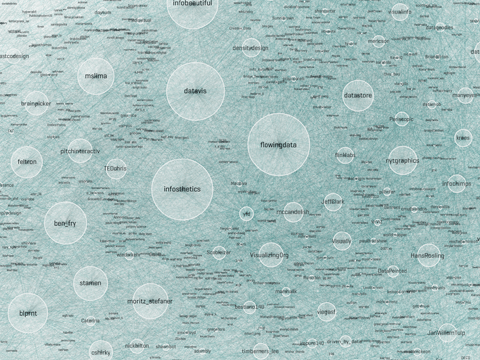
I dropped him a note wondering if he'd tried any social network analysis methods to simplify it, or otherwise break it down -- so he sent me the data and said "have a go!" If I had crawled twitter links myself, I might not have used his criteria or seed set, but I was curious if I could make any more sense of his data set as is. (So I've neither re-crawled, nor added any info such as frequency or content of tweets to this data set).
I compared some of the measures calculated by the python library NetworkX with measures calculated by Gephi. The two tools produce slightly different scores for some metrics, an interesting fact which I have not investigated deeply. I've made my spreadsheet of the calculated stats available for you on Google Docs. (Variables prefixed with "NX" are calculated with NetworkX and with "Gi" were calculated by Gephi.)
First, some overall stats on the network in Moritz's dataset:
Derek Green's excellent tutorial for NetworkX suggests doing community detection using another python library for the Louvain method. At superficial review, it's similar to the Gephi modularity class detection algorithm, but I got slightly different results from the two methods. [Update: The method is non-deterministic and results will vary depending on starting values used]. NetworkX generally finds 5 communities, and Gephi alternates between finding 4 or 5. Here is one confusion matrix, showing the differences between node allocations assigned by NetworkX and Gephi; in this chart, squares are sized according to number of nodes assigned to each group:

So, interpreting this: In one run, Gephi split up the folks who are in NetworkX's community 0 into Gephi's communities A, B, C, D. Gephi's community C mostly overlaps NetworkX's community 1.
For the rest of this post, I'll illustrate from NetworkX's community divisions, which I spent more time investigating. When I looked at the force-directed layouts and stats for the community members, I decided on these approximate group names, based on what I knew of the id's in each group:
To make sensible (i.e., less hairy) plots, I filtered for the top 5% by degree calculation. "Degree" corresponds to sum of in-degree and out-degree edges; in other words, how many people a node (or twitter id, in this case) is linked from and to by other nodes. High "in-degree" count usually implies someone is a perceived authority in the network. High "out-degree" might suggests a social media corporate type. Well, not necessarily - but it means they follow a lot of folks, and could themselves be a useful information source if they also have high centrality and share their information. (Like I said, I didn't look at who said what or how often they tweeted, which would be important measures of health in this network.)
Here's a plot of Gephi's authority calculation vs. degree, strongly correlated (you may see why I named Community 0 "The Authorities"):

Sorting by degree, the top players are these (pulled from the spreadsheet):
Showing edges in hairball graphs makes things really complicated. For the following network graphs, I've limited the displayed nodes and edges to the top 5% by degree measure. Here's an animation of the difference between all edges visible vs. just community-internal edges (I know it's subtle, sorry; the id names are sized by relative degree):

The largest names are purple, community 0, or "The Authorities" (a proxy for degree in this case).
Since I chose "degree" for relative sizing, it's worth seeing that in- and out-degree are not always correlated. Here you can see that some "true" authorities have much higher in-degree than out-degrees. In particular, VizWorld has very high out-degree but rather smaller in-degree. And by NetworkX's community assignment, he does not end up grouped with the purple community 0. (Click for larger view.)

However, when we look at betweenness-centrality, VizWorld scores quite high. Betweenness-centrality (or centrality) roughly measures connectedness to components of the larger graph.

If you'd like to inspect the internal linkage structure corresponding to each community subgroup, click on the small images below to view. I've filtered out all but the top 5% by degree, to highlight the authorities in each sub-group. (Note that this was insufficient for community 3 -- so I expanded it a bit more.) The curved edges indicate "mutual" follow relations, while the straight edges indicate uni-directional, or one-way follow relations.
Notice that community 0, the purple one, has a surprising number of unidirectional links, as does community 3. The others seem to be dominated by curved lines, a high degree of mutuality. (Hopefully I can explore this later!)
Depending on what you know about the players in these graphs, you will probably see things I don't see. I myself have very little familiarity with the names in communities 3 and 4, while I admit to being surprised or entertained by the links and organization in the other 3 graphs. For example, in community 0, the placement of Visually, and its straight line uni-directional links, is especially interesting to me. (Remember this graph represents the top 5% by degree-- so Visually at this time scored high on degree, and was classified as a member of the "Authorities" group 0 by the community algorithms, but was not itself closely followed by the others in this elite group.) Green community 2 is also interesting; certainly the artistic folks are there, including the founders, authors, and teachers of Processing courses (ben_fry, REAS, shiffman, blprnt, toxi, mariuswatz, ...); but this group also includes Brainpicker and well-known design firms like Stamen and PitchInteractiv.
Wrapping up, these are the tools I used for the analysis, charts, and graphs: Excel, Tableau (for scatterplots), Python, R (correlation plots which weren't shown here), Gephi, Google Docs, Illustrator and Photoshop. It took more time than I expected, in part because of Gephi's alpha status, and having to adjust a lot of the plots by hand in Illustrator! Hopefully the need for hand-tweaking will disappear as Gephi becomes more mature.
Postscript: While I was working on this, MS Lima's new book, Visual Complexity, shipped from Amazon. It's a beautiful collection of network visualizations.
I dropped him a note wondering if he'd tried any social network analysis methods to simplify it, or otherwise break it down -- so he sent me the data and said "have a go!" If I had crawled twitter links myself, I might not have used his criteria or seed set, but I was curious if I could make any more sense of his data set as is. (So I've neither re-crawled, nor added any info such as frequency or content of tweets to this data set).
I compared some of the measures calculated by the python library NetworkX with measures calculated by Gephi. The two tools produce slightly different scores for some metrics, an interesting fact which I have not investigated deeply. I've made my spreadsheet of the calculated stats available for you on Google Docs. (Variables prefixed with "NX" are calculated with NetworkX and with "Gi" were calculated by Gephi.)
First, some overall stats on the network in Moritz's dataset:
- 1644 twitter id's are represented, and there are 145,382 edges, or links, between id's.
- Gephi reports the average path length is 2.5.
- Gephi and NetworkX say this is a connected graph; Gephi reports 1 weakly and 5 strongly connected components.
- The average degree is 89.9, but the median is 51. There is a long tail here, meaning that some nodes have very high degree (see below) but most do not.
Derek Green's excellent tutorial for NetworkX suggests doing community detection using another python library for the Louvain method. At superficial review, it's similar to the Gephi modularity class detection algorithm, but I got slightly different results from the two methods. [Update: The method is non-deterministic and results will vary depending on starting values used]. NetworkX generally finds 5 communities, and Gephi alternates between finding 4 or 5. Here is one confusion matrix, showing the differences between node allocations assigned by NetworkX and Gephi; in this chart, squares are sized according to number of nodes assigned to each group:
So, interpreting this: In one run, Gephi split up the folks who are in NetworkX's community 0 into Gephi's communities A, B, C, D. Gephi's community C mostly overlaps NetworkX's community 1.
For the rest of this post, I'll illustrate from NetworkX's community divisions, which I spent more time investigating. When I looked at the force-directed layouts and stats for the community members, I decided on these approximate group names, based on what I knew of the id's in each group:
- Group 0: The Authorities
- Group 1: The Researchers
- Group 2: The Processing Crowd
- Group 3: The Small NYT Group
- Group 4: MSLima's Crowd
To make sensible (i.e., less hairy) plots, I filtered for the top 5% by degree calculation. "Degree" corresponds to sum of in-degree and out-degree edges; in other words, how many people a node (or twitter id, in this case) is linked from and to by other nodes. High "in-degree" count usually implies someone is a perceived authority in the network. High "out-degree" might suggests a social media corporate type. Well, not necessarily - but it means they follow a lot of folks, and could themselves be a useful information source if they also have high centrality and share their information. (Like I said, I didn't look at who said what or how often they tweeted, which would be important measures of health in this network.)
Here's a plot of Gephi's authority calculation vs. degree, strongly correlated (you may see why I named Community 0 "The Authorities"):
Sorting by degree, the top players are these (pulled from the spreadsheet):
| Label | NetworkX Community | Gephi Class | Degree | Closeness Centrality | Betweenness Centrality |
|---|---|---|---|---|---|
| flowingdata | 0 | D | 1394 | 0.446930423 | 0.043313537 |
| datavis | 0 | A | 1376 | 0.482190168 | 0.072294856 |
| infosthetics | 0 | A | 1362 | 0.435290991 | 0.034115345 |
| infobeautiful | 0 | D | 1074 | 0.391210891 | 0.007498017 |
| blprnt | 2 | B | 932 | 0.410115173 | 0.02337346 |
| ben_fry | 2 | B | 882 | 0.365625 | 0.006936445 |
| moritz_stefaner | 0 | B | 870 | 0.452361226 | 0.028942168 |
| eagereyes | 1 | C | 861 | 0.455126424 | 0.031837862 |
| mslima | 4 | A | 828 | 0.433448002 | 0.014404322 |
| VizWorld | 4 | A | 828 | 0.524495677 | 0.08984938 |
Showing edges in hairball graphs makes things really complicated. For the following network graphs, I've limited the displayed nodes and edges to the top 5% by degree measure. Here's an animation of the difference between all edges visible vs. just community-internal edges (I know it's subtle, sorry; the id names are sized by relative degree):
Non-animated, larger versions: With All Edges, Only Intra-Community Edges


The largest names are purple, community 0, or "The Authorities" (a proxy for degree in this case).
Since I chose "degree" for relative sizing, it's worth seeing that in- and out-degree are not always correlated. Here you can see that some "true" authorities have much higher in-degree than out-degrees. In particular, VizWorld has very high out-degree but rather smaller in-degree. And by NetworkX's community assignment, he does not end up grouped with the purple community 0. (Click for larger view.)
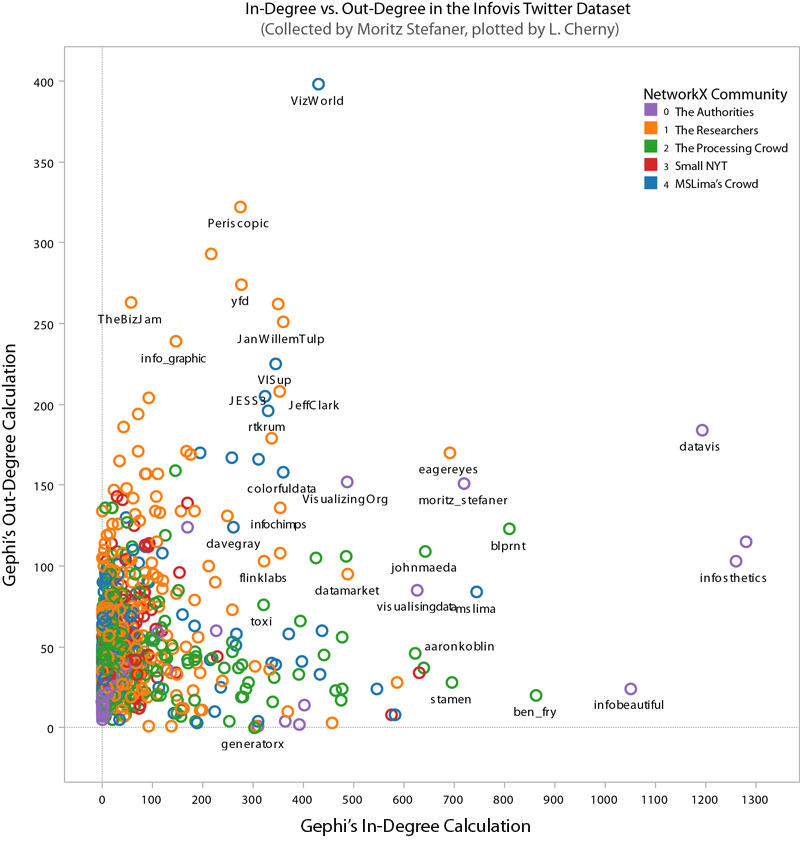
However, when we look at betweenness-centrality, VizWorld scores quite high. Betweenness-centrality (or centrality) roughly measures connectedness to components of the larger graph.

If you'd like to inspect the internal linkage structure corresponding to each community subgroup, click on the small images below to view. I've filtered out all but the top 5% by degree, to highlight the authorities in each sub-group. (Note that this was insufficient for community 3 -- so I expanded it a bit more.) The curved edges indicate "mutual" follow relations, while the straight edges indicate uni-directional, or one-way follow relations.
 |
| community 0, The Authorities |
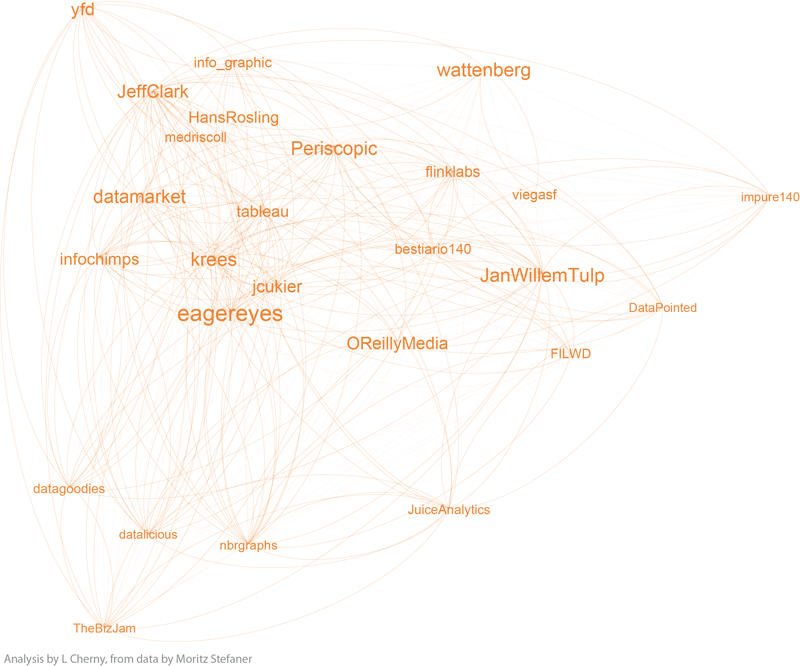 |
| community 1, the Researchers |
 |
| community 2, the Processing Crowd |
 |
| community 3, the small NYT group |
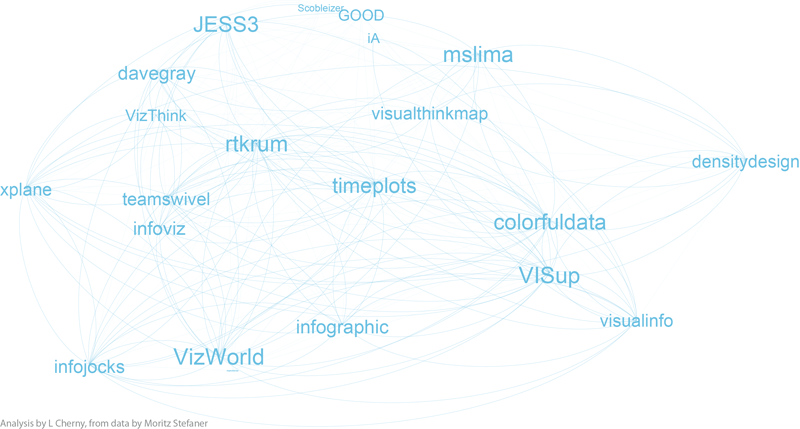 |
| community 4, MSLima's crowd |
Notice that community 0, the purple one, has a surprising number of unidirectional links, as does community 3. The others seem to be dominated by curved lines, a high degree of mutuality. (Hopefully I can explore this later!)
Depending on what you know about the players in these graphs, you will probably see things I don't see. I myself have very little familiarity with the names in communities 3 and 4, while I admit to being surprised or entertained by the links and organization in the other 3 graphs. For example, in community 0, the placement of Visually, and its straight line uni-directional links, is especially interesting to me. (Remember this graph represents the top 5% by degree-- so Visually at this time scored high on degree, and was classified as a member of the "Authorities" group 0 by the community algorithms, but was not itself closely followed by the others in this elite group.) Green community 2 is also interesting; certainly the artistic folks are there, including the founders, authors, and teachers of Processing courses (ben_fry, REAS, shiffman, blprnt, toxi, mariuswatz, ...); but this group also includes Brainpicker and well-known design firms like Stamen and PitchInteractiv.
Wrapping up, these are the tools I used for the analysis, charts, and graphs: Excel, Tableau (for scatterplots), Python, R (correlation plots which weren't shown here), Gephi, Google Docs, Illustrator and Photoshop. It took more time than I expected, in part because of Gephi's alpha status, and having to adjust a lot of the plots by hand in Illustrator! Hopefully the need for hand-tweaking will disappear as Gephi becomes more mature.
Postscript: While I was working on this, MS Lima's new book, Visual Complexity, shipped from Amazon. It's a beautiful collection of network visualizations.
Subscribe to:
Posts
(
Atom
)